
Enhancing Malicious IP Detection and Intelligence Using Abuse.ch API

I recently finished a project aimed at improving the detection and threat intelligence of malicious IPs on an organization's network and assets.
Summary:
The project leveraged Wazuh as the SIEM tool (Other SIEM tools include Splunk, Microsoft Sentinel, and IBM QRadar), abuse.ch as the indicator-of-compromise source, and a Python script that pulls the malicious IP address from abuse.ch via an API into the Wazuh manager.
The Wazuh manager executes the script every 6 hours via a cron job and saves its output to a separate file. This file is referenced by another file that contains the detection rule that all agents connected to the Wazuh server/manager must obey.
The aim of the project is to enhance an organization's IP intelligence by detecting more malicious IP addresses, which are automatically fed into the detection rules, thereby blocking them from accessing our organization’s network.
The flow is as follows: Wazuh runs a Python script that pulls malicious IP addresses into a file. This file is checked by the Wazuh manager when an IP appears in the logs, and if a match is found, the active response is triggered.
Requirements
A Wazuh Server/Manager - This must run on a Linux machine.
Wazuh Agents: Windows, Linux, macOS
Python 3.9 for writing and executing the Python script.
MalwareBazaar’s API
Set Up
Refer to this guide to set up Wazuh.
On your Wazuh Server/Manager, install Python 3
sudo apt update -y && sudo apt upgrade -y
sudo apt install python3
Confirm your installation using:
python -version
Create your Python script. This script pulls the malicious IP address from MalwareBazaar using the abuse.ch feature API.
#!/usr/bin/env python3
import requests
from xml.etree.ElementTree import Element, SubElement, tostring, parse
from xml.dom import minidom
import os

# === CONFIG ===
API_KEY = 'redacted'  # Replace with your AbuseIPDB API key
OUTPUT_FILE = '/var/ossec/etc/lists/malicious_ips_list.xml'

# AbuseIPDB blacklist endpoint
URL = 'https://api.abuseipdb.com/api/v2/blacklist'
headers = {
    'Accept': 'application/json',
    'Key': API_KEY
}

try:
    response = requests.get(URL, headers=headers)
    response.raise_for_status()
    data = response.json()
    new_ips = [entry['ipAddress'] for entry in data['data']]

    # Load existing XML if it exists
    existing_ips = set()
    if os.path.exists(OUTPUT_FILE):
        tree = parse(OUTPUT_FILE)
        root = tree.getroot()
        for value in root.findall('value'):
            existing_ips.add(value.text)

    # Merge new IPs with existing ones
    all_ips = existing_ips.union(new_ips)

    # Create XML structure
    root = Element('list', name="malicious_ips_list", key="srcip")
    for ip in sorted(all_ips):
        SubElement(root, 'value').text = ip

    # Pretty print XML
    xml_str = minidom.parseString(tostring(root)).toprettyxml(indent="  ")

    # Write to file
    with open(OUTPUT_FILE, 'w') as f:
        f.write(xml_str)

    print(f"[+] Saved {len(all_ips)} malicious IPs to {OUTPUT_FILE}")

except Exception as e:
    print(f"[-] Error fetching or saving data: {e}")
Make the script executable using this command:
chmod +x /usr/local/bin/abuse.py
Create a cron job to run the script every 6 hours. First, I need to enter the cron tab:
sudo crontab -e
Then paste the cron command at the end of the contents:
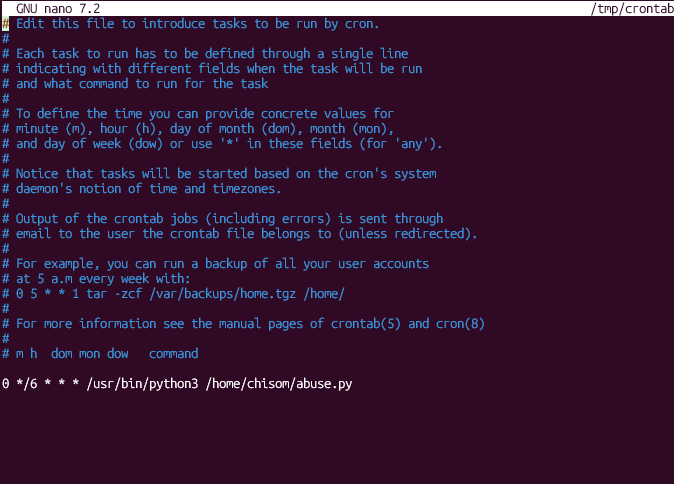
0 */6 * * * /usr/bin/python3 /usr/local/bin/abuse.py
Once you are done with this, navigate to the directory bearing the local_rules.xml
You may want to log in as root to access this file, as it is within the Wazuh configuration environment.
Run: sudo -i to login as root. Navigate to cd /var/ossec/etc

Then, navigate to the rules directory using cd rules, then open the local_rules.xml file using the nano local_rules.xml command
Paste this syscheck rule, or modify it to suit your organization. Ensure that the rule ID is above 10000
<group name="local,threat-intel,">
  <rule id="100002" level="10">
    <if_sid>100000</if_sid>
    <list lookup="match_key" field="srcip">malicious_ips_list</list>
    <description>Connection from known malicious IP detected</description>
  </rule>
</group>

After setting this rule, restart the Wazuh manager, then check for its status:
systemctl restart wazuh-manager
systemctl status wazuh-manager
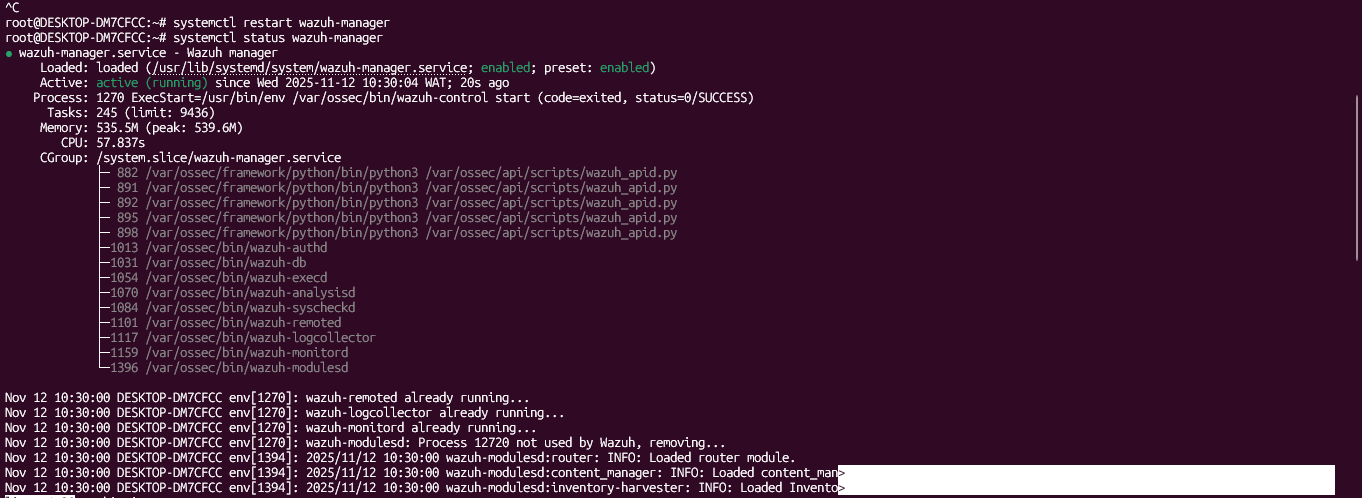
Once you confirm that your manager is active and running, check that the script runs:
sudo /usr/bin/python3 /home/chisom/abuse.py
Running this command should execute the script, navigate back to your malicious_ips_list.txt folder, then open the file; you should see many IP addresses.
Active Response
The IP addresses in the malicious_ips_list.txt The file would be checked by Wazuh whenever an agent logs an IP address, and if a match is found, an alert is triggered on the dashboard.
However, to take this further, we can set up an active response for automated actions, especially in situations where our agents often face brute-force attacks (brute-force attack logs often include IP addresses).
For instance, if we want to drop all malicious IPs, we can configure our active response to read the local_rules.xml and execute accordingly.
Since I am leveraging the firewall-drop script, a default Active Response script on Wazuh, I simply need to navigate to the active response directory: cd /var/ossec/etc
Open the ossec.conf file, and locate the active response section; paste your rule, something like this, at the end of the section:
<disabled>no</disabled>
  <command>firewall-drop</command>
  <location>local</location>    <!-- runs on the agent that triggered it -->
  <rules_id>100002</rules_id> <!... Our rule id from above is 100002 ...>
  <timeout>6000</timeout>       <!-- unblock after 600s ...>

Restart your Wazuh manager using systemctl restart wazuh-manager and systemctl status wazuh-manager.

Once this is done, any IP address pulled by the abuse.py script that appears in any agent’s log will be dropped for 6000 seconds (100 minutes). You can increase the time limit as you wish.